 by
by The Chhattisgarh Board of School Education (CGBSE) will be declaring the results of the Senior Secondary Examination or Intermediate Exam (Class 12 Exam) in the month of May 2026. The CGBSE Class 12 exam results will be uploaded on the official portal, cgbse.nic.in. Students can then go to the official website to check/access their respective exam results.
The Chhattisgarh Board (CGBSE) Class 12th Result 2026 is expected to be declared on May 7, 2026, around 3:00 PM.
The CG Board offers students the option of revaluation of their answer sheets in case they are not satisfied with their exam results.
Students who qualify the CG Board Class 12 exams can enroll for undergraduate courses in fields of their choice.
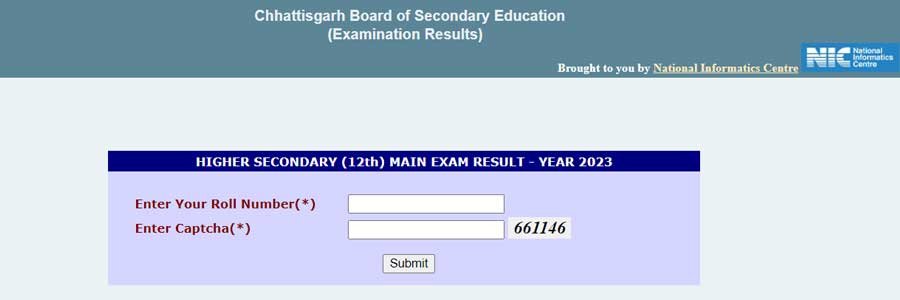
Check Chhattisgarh Class 12th Result 2026
| CGBSE 12th Result 2026 – Overview | |
|---|---|
| Exam Name | CGBSE Higher Secondary School Certificate (HSSC) Exam 2026 |
| Board Name | Chhattisgarh Board of Secondary Education (CGBSE) |
| Result Name | CG Board 12th Result 2026 |
| CG Board 12th Exam Dates | February 20 to March 18, 2026 |
| CG Board 12th Result Release Date | Expected: May 7, 2026 (Tentative) |
| CG Board 12th Declaration Mode | Online and via SMS |
| Credentials Required | Roll Number and Captcha Code |
| Official Website | cgbse.nic.in / results.cg.nic.in |
CGBSE Class 12 Exam Result: Different Ways to Check
Students can check their CG Board Class 12 exam results as per the details below:
Steps to Check the CG Board Class 12 Exam Result on the Official Website
| How to Check CGBSE 12th Result 2026 Online | |
|---|---|
| Step 1 | Visit the official Chhattisgarh Board results portal: cgbse.nic.in or results.cg.nic.in. |
| Step 2 | On the homepage, click on the link titled “Higher Secondary (12th) Examination Result – 2026”. |
| Step 3 | Enter your Roll Number and the Captcha Code (Security Code) as shown on the screen. |
| Step 4 | Click the “Submit” button to view your marksheet and qualifying status. |
| Step 5 | Download the digital copy and take a printout of your CGBSE 12th result for your future academic records. |
Steps to Check the CG Board Class 12 Exam Result via SMS
- The initial step includes accessing the “Message” application on your cell phone
- The next step is to go to a “New Message” window and type a message in the following format: CG12-Roll Number
- The subsequent step entails sending this message to the 56263 number
- Shortly thereafter, you will receive your CG Board Class 12 exam result via SMS
| CGBSE 12th Result – Grading System | ||
|---|---|---|
| Marks | Grade Point | Grades |
| 91-100 | 10 | A1 |
| 81-90 | 9 | A2 |
| 71-80 | 8 | B1 |
| 61-70 | 7 | B2 |
| 51-60 | 6 | C1 |
| 41-50 | 5 | C2 |
| 33-40 | 4 | D |
| 21-32 | C | E1 |
| 00-20 | C | E2 |